
A read-it-later app sounds simple. You find something worth reading, save it, and come back when you have time.
But the habit is rarely that clean.
You might save a long article in one place, an X post in another, a documentation page in your browser bookmarks, and a PDF somewhere in Downloads. A few days later, you remember the idea but not where you saved it.
That is why choosing a read-it-later app is not only about the reading view. It is also about what you save, how you search later, and whether the app helps you return to things you would otherwise forget.
What a Read-It-Later App Needs to Do Now
For a long time, Pocket was one of the default answers to this problem. Mozilla shut Pocket down on July 8, 2025. Its export window closed on November 12, 2025, and user data deletion began after that.
That makes the category feel more open again. If you are choosing a read-it-later app now, it helps to start with a more practical question:
What do you actually save?
For many people, the answer is not just articles. It includes:
- Long blog posts and essays
- Newsletters
- X posts
- Official documentation
- Product pages and tools to try later
- PDFs
- Reference pages you may need again
If your saved items are mostly articles, a focused reading app can work well. If your saved items are a mix of articles, bookmarks, docs, and tools, you may need something closer to a personal library.
Instapaper
Instapaper is a straightforward read-it-later app.
It is a good fit if you mostly save articles and want a quiet place to read them later. You can save unlimited articles, videos, and pages on the free plan, then read them across web, iOS, and Android.
The paid plan, Instapaper Premium, is listed at $5.99 per month or $59.99 per year. It adds full-text search, PDF Reader, Permanent Archive, unlimited notes, Kindle integration, text-to-speech playlists on mobile, and an ad-free Instapaper website.
Instapaper is easiest to understand as a reading app. If your main problem is “I want a clean place to read articles later,” it belongs on your shortlist.
It is less ideal if you want one place for everything you save online. Documentation pages, tool pages, and everyday bookmarks can fit, but they are not the center of the product.
Raindrop.io
Raindrop.io is closer to a bookmark manager than a pure reading app.
It works well if you save many kinds of links and care about collections, tags, and organization. You can use it for articles, tools, reference pages, design inspiration, documentation, and other pages you want to keep.
According to the Raindrop.io pricing page, the free plan includes unlimited bookmarks, collections, highlights, and devices. The Pro plan adds features such as full-text search, web archive, reminders, annotations, duplicate and broken link finding, daily backups, and more upload space.
Raindrop.io is a strong choice if your saved items feel like a library you want to organize.
The tradeoff is that organization still depends on you. If you create collections and tags but rarely open them again, it can become another well-organized place where useful links go quiet.
Readwise Reader
Readwise Reader is a fuller reading workflow.
It is built for people who save, read, highlight, annotate, and later reuse what they read. Reader works across the web, mobile apps, desktop apps, and browser extensions, and its docs describe sections for content such as PDFs and feeds. Highlights made in Reader sync with Readwise, and from there can move into note-taking tools.
The Readwise pricing page lists Readwise, including Reader, at $9.99 per month when billed annually, or $12.99 when billed monthly. Readwise says it includes all Reader features, all Readwise features, highlight import, tags and notes, export to tools such as Notion and Obsidian, and Daily Review.
Readwise Reader is worth considering if reading is part of a larger knowledge workflow. It is especially relevant if highlights, exports, and review are important to you.
If your need is simpler, it may feel heavy. Sometimes you do not want a full reading system. You just want to save a useful page and make sure you can find it later.
Osarai
Osarai is the service behind this blog.
Osarai is for people who save things to read, try, use, or revisit later. That can include web articles, X posts, official documentation, tool pages, and PDFs.
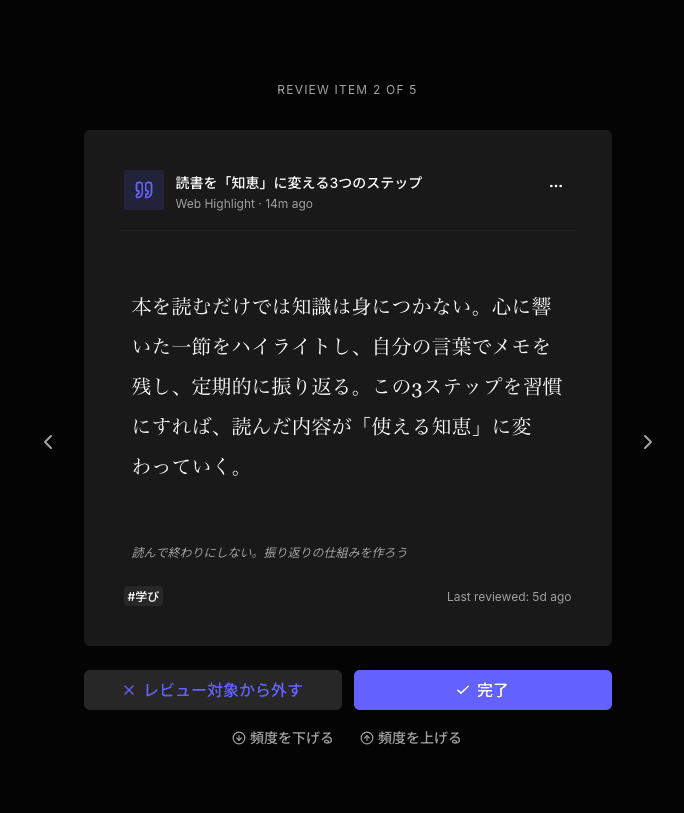
Saved articles can be read in a clean, ad-free reader. Search covers title, description, and your own notes, with full-text search available on Pro. You can also use daily review to bring back saved items you may have forgotten.
That last part matters.
Search helps when you remember what you are looking for. Daily review helps when you forgot you saved something in the first place.
Osarai is a good fit if your saved items are not only “articles to read later.” It fits better when articles, bookmarks, docs, tools, PDFs, and X posts are all part of the same information habit.
It is not a service for restoring lost Pocket data. It is also not a complete replacement for every reading, highlighting, or note-taking workflow. It is best understood as one place to save, read, search, and revisit the things you do not want to lose track of.
 Osarai
Save links. Find them again.
Save articles and posts you want for later in one place. Search what you remember, and let daily review bring buried saves back.
How to Choose Between Them
Start with the kind of saved items that cause the most friction for you.
If your queue is mostly long articles, Instapaper is easy to try. It keeps the experience focused and calm.
If your saved items are mostly links you want to organize by topic, Raindrop.io is a better match. It gives you collections, tags, and stronger bookmark-management features.
If you highlight heavily and want your reading to feed into a knowledge system, Readwise Reader is the strongest fit. It is more than a read-it-later app, and that is the point.
If your real problem is that useful things disappear after you save them, Osarai is worth trying. It combines saving, reading, search, and review so that articles, bookmarks, docs, tools, and PDFs do not have to live in separate places.
A Simple Test Before You Commit
You do not need to move your whole workflow on day one.
Pick four things you would normally save:
- One long article
- One X post
- One documentation page
- One PDF or tool page
Save all four into the app you are considering. Then wait a few days.
When you come back, ask three questions:
- Can I read the article comfortably?
- Can I find the saved item I remember?
- Does the app help me return to something I forgot?
The third question is easy to miss. It is also where many read-it-later workflows break.
Saving is only the first step. The real value appears when the thing you saved comes back at the right time.
Summary
The best read-it-later app depends on what you save and what usually goes wrong afterward.
Instapaper is a focused place to read articles later. Raindrop.io is a strong bookmark manager for organized link libraries. Readwise Reader is a full reading and highlighting workflow. Osarai is for people who want one place to save articles, X posts, docs, tool pages, and PDFs, then read, search, and revisit them later.
If your saved links already disappear across too many places, start with the app that matches that problem. A good read-it-later app should not only help you save more. It should help you come back to what was worth saving.
OsaraiSave links. Find them again.
Save articles and posts you want for later in one place. Search what you remember, and let daily review bring buried saves back.
Read more

Save Articles for Later: 5 Places That Help You Actually Read Them
Saving an article is easy. Reading it later is the hard part. Compare browser bookmarks, Instapaper, Raindrop.io, Readwise Reader, and Osarai to pick a place you will actually revisit.

Bookmark Manager Guide: How to Save, Find, and Revisit Links
Compare browser bookmarks, bookmark managers, read-it-later apps, web clippers, and Osarai to choose where to save links.

Matter Alternatives: Six Options for Saving, Reading, and Revisiting
Matter is still running, but it does not fit every reader. Compare Readwise Reader, Raindrop.io, Instapaper, Wallabag, Readeck, and Osarai and pick what matches how you actually save and read.