
A bookmark manager should do more than store URLs.
That may sound obvious, but it is the difference between a link you can use later and a link that quietly disappears into a folder. Most people do not save only homepages anymore. They save articles, X posts, documentation, tool pages, PDFs, newsletters, research notes, comparison pages, and ideas they want to revisit.
The hard part is not always saving the link. The hard part is finding it again, remembering why you saved it, and turning it back into something useful.
This guide looks at the main types of bookmark managers available today: browser bookmarks, dedicated bookmark managers, read-it-later apps, web clippers, and Osarai. The goal is not to rank every tool. It is to help you choose the right place for the things you save.
When Browser Bookmarks Are Enough
Built-in browser bookmarks are still useful. If you mainly save sites you visit often, Chrome bookmarks may be all you need.
According to Google Chrome Help, Chrome can remember favorite and frequently visited websites. If you sign in to Chrome with your Google Account, you can use bookmarks and other information across your devices. Chrome also lets you search bookmarks from the address bar by typing @bookmarks, pressing Tab or Space, then entering keywords.
That makes browser bookmarks good for:
- Sites you open every week
- Work tools you need quickly
- Personal admin pages
- Reference pages with obvious names
- A small number of folders you already keep tidy
Browser bookmarks start to feel limited when your saved links become a mixed library. A folder called "Read later" often turns into a backlog. A folder called "Tools" can hold product pages, pricing pages, documentation, templates, and half-tested apps. Search helps, but only if you remember the title or folder.
If your main problem is quick access, browser bookmarks are fine. If your main problem is "I saved something useful and cannot find it again," you may need a different workflow.
The Main Types of Bookmark Managers
A bookmark manager can mean several different things. Before choosing a tool, it helps to know which problem you are solving.
Browser Built-In Bookmarks
This is the default option in Chrome and other browsers. It is best for links you already know you will revisit.
Use it when you want a stable shortcut system. It is less ideal when you are collecting reading material, research, inspiration, or temporary links that need context.
Dedicated Bookmark Managers
Dedicated bookmark managers are built around saving and organizing many links outside the browser's native bookmark system.
For example, Raindrop.io's browser extension documentation describes the extension as a quick way to save bookmarks, highlights, and tabs. It also documents saving the current page or a link, adding highlights, saving all open tabs, and searching bookmarks from the address bar by typing rd and pressing Tab.
This kind of tool is useful if you want more structure than the browser gives you. Tags, collections, saved tabs, highlights, and richer search can matter when your library grows.
Read-It-Later Apps
Read-it-later apps are best when the saved item is something you plan to read.
Instapaper's Chrome Web Store listing describes its browser extension as a way to save links for offline reading and save articles directly into an Instapaper queue.
Readwise Reader's saving content documentation says its browser extension saves articles to Reader and can optionally support highlighting on the open web. The same documentation notes that saving through the extension can save a clean, readable version of a document to the Reader inbox.
These tools are strong when your saved links are mostly articles, essays, newsletters, or long reads. They may be less natural for tool pages, product references, docs you need during work, or links you want to try later rather than read.
Web Clippers
Web clippers are often attached to note-taking or workspace tools.
Notion's Web Clipper Help Center describes Web Clipper as a way to save any web page to a Notion workspace so you can read or edit it later. On desktop, it is available as a browser extension for Chrome, Firefox, and Safari. The Help Center also explains that you can choose the workspace and page or database where the web page should be saved. When clipping into a database, Notion adds a URL property for the original page. Notion also says you can add tags, other properties, comments, and edits to clipped pages.
Evernote Web Clipper's quick start guide describes it as a browser extension for capturing full-page articles, images, selected text, important emails, and web pages. Evernote's guide also shows clip types such as Article, Simplified Article, and Screenshot, and says you can add a tag or comment before saving a clip.
Web clippers are useful when saved links are part of a larger note system. They are a good fit if you already live in Notion or Evernote and want clips to become project material, research notes, or reference pages.
How to Choose the Right Bookmark Manager
The right bookmark manager depends on what happens after you click save.
A simple way to choose is to ask four questions.
Are You Saving Shortcuts or Future Reading?
If you save links because you want quick access, browser bookmarks are usually enough.
If you save links because you intend to read them, a read-it-later app may fit better. Instapaper and Readwise Reader are both designed around saving reading material into a queue or library.
If you save both shortcuts and reading material, splitting everything across separate tools can become messy. You may bookmark a documentation page in Chrome, save an article to a read-it-later app, clip a reference into Notion, and then forget where each thing went.
In that case, the important question is not "Which app has the most features?" It is "Where will I actually look later?"
Do You Remember Titles, or Do You Remember Fragments?
Bookmark search often depends on titles, URLs, folders, or tags. That works when the saved item has a memorable name.
But many useful links are not remembered that way. You may remember:
- A phrase from the article
- The problem the page helped solve
- The name of a framework mentioned in the body
- A note you wrote to yourself
- The reason you saved it
For large libraries, search needs to match the way memory works. Title search is helpful. Full-text search and notes can be more helpful when you only remember part of the content or the context.
This is one reason Osarai focuses on saved items becoming findable later. On the Osarai official site, Osarai describes search across titles, descriptions, notes, and full text, so you can find saved articles and pages from words you remember.
Do You Need Organization, or Do You Need Revisit?
Many bookmark tools focus on organization. That is useful. Folders, tags, collections, databases, and notebooks all help you put a link somewhere.
But organization does not guarantee return.
A perfectly tagged article can still be forgotten. A carefully saved tool page can still sit unused. A clipped reference can still disappear inside a workspace.
If your saved links are mostly reference material, organization may be enough. If your saved links are things you want to read, try, compare, or use someday, you may also need a habit that brings them back.
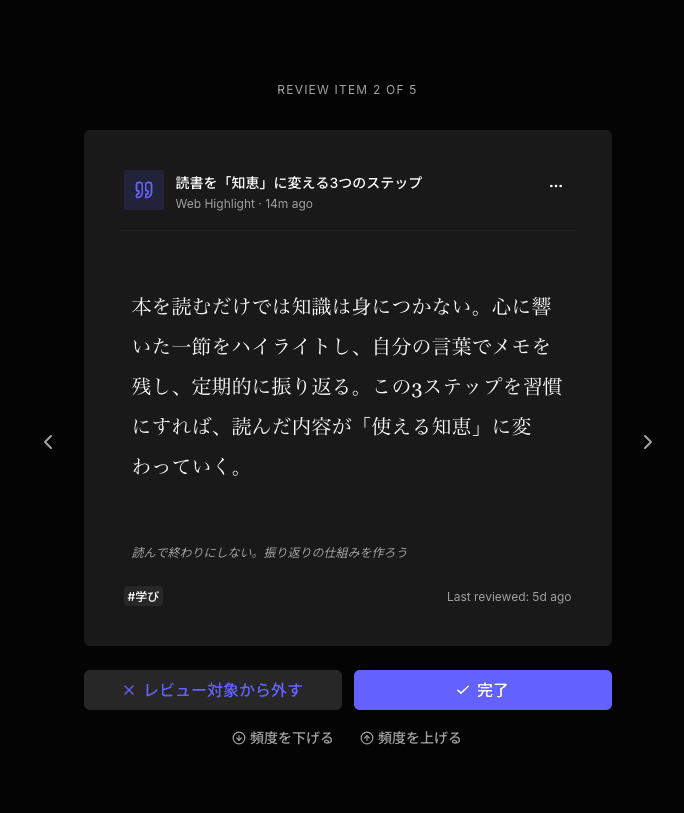
Osarai is built around that problem. It is not only a place to save links. It also uses daily review to bring back saved articles, posts, pages, and highlights you might otherwise forget. Osarai's site describes this as a way to let daily review bring back what you forgot.
 Osarai
Save links. Find them again.
Save articles and posts you want for later in one place. Search what you remember, and let daily review bring buried saves back.
What Kind of Content Do You Save?
The best bookmark manager for you depends on your content mix.
Use browser bookmarks if you mainly save:
- Frequently visited websites
- Work dashboards
- Login pages
- A small number of reference links
Use a dedicated bookmark manager if you mainly save:
- Many links across topics
- Tabs you want to keep
- Highlighted web passages
- Collections you want to browse later
Use a read-it-later app if you mainly save:
- Articles
- Essays
- Newsletters
- Long-form reading
Use a web clipper if you mainly save:
- Research into a workspace
- Web pages that should become notes
- References for projects
- Pages that need tags, comments, or database properties
Use Osarai if you mainly save:
- Articles you want to read later
- X posts you want to revisit
- Documentation you may need again
- Tool pages you want to try
- PDFs and pages you want in one place
- Links you want to search later from titles, descriptions, notes, or full text
- Saved items you want to be reminded of through daily review
Where Osarai Fits
Osarai is a bookmark manager for people who save things for later and want those things to come back when they matter.
It is not trying to replace every bookmark workflow. If your browser bookmarks are a neat shortcut bar, keep using them. If your whole research system already lives in Notion or Evernote, a web clipper may be the natural entry point. If your reading workflow depends on a dedicated read-it-later app, that may still be the right place for long-form reading.
Osarai is useful when your saved links are mixed. You might save an article, an X post, a documentation page, a PDF, and a tool page in the same week. Some are for reading. Some are for trying later. Some are references. Some are ideas you do not want to lose.
According to the Osarai official site, Osarai lets you save X posts, web articles, docs, and PDFs. It also provides a Chrome browser extension for saving the article or page you are reading in one click. Saved articles can be read in a clean reader, and pages you want to use again can be kept as bookmarks.
The key difference is the loop:
- Save what you want later
- Read saved articles in a clean reader
- Search titles, descriptions, notes, and full text
- Use daily review to revisit things you forgot
That makes Osarai a good fit for people whose saved links are not only a filing system. They are a working memory.
A Practical Bookmark Manager Setup
You do not need to move every link into one tool.
A practical setup can look like this:
- Keep browser bookmarks for stable shortcuts
- Use a read-it-later app if you have a dedicated reading queue
- Use Notion or Evernote when a saved page belongs inside a project or knowledge base
- Use a dedicated bookmark manager when you need collections, tabs, and richer organization
- Use Osarai for saved articles, X posts, docs, PDFs, and pages you want to find and revisit later
This avoids forcing every saved item into the same shape.
A dashboard URL is not the same as a 3,000-word article. A PDF is not the same as a product page you want to try. A documentation page is not the same as a note in a project database.
The best bookmark manager is the one that matches the future action. Open often. Read later. Research. Try someday. Find again. Review.
The Bottom Line
If you only need fast access to familiar sites, your browser's built-in bookmarks may be enough.
If you need stronger organization, look at dedicated bookmark managers such as Raindrop.io. If you need a reading queue, look at tools such as Instapaper or Readwise Reader. If your saved pages belong inside a workspace, Notion Web Clipper or Evernote Web Clipper may be a better fit.
If your main problem is that saved links become forgotten links, Osarai is worth considering. It gives you one place for articles, X posts, docs, PDFs, and pages you want later, then helps you search and revisit them.
A bookmark manager should not only help you save more. It should help you use what you already saved.
OsaraiSave links. Find them again.
Save articles and posts you want for later in one place. Search what you remember, and let daily review bring buried saves back.
Read more

Save Articles for Later: 5 Places That Help You Actually Read Them
Saving an article is easy. Reading it later is the hard part. Compare browser bookmarks, Instapaper, Raindrop.io, Readwise Reader, and Osarai to pick a place you will actually revisit.

Read-It-Later Apps: How to Choose Where to Save Articles, Docs, and Links
Compare read-it-later apps for articles, X posts, docs, tool pages, and PDFs. Learn when to use Instapaper, Raindrop.io, Readwise Reader, or Osarai.

Matter Alternatives: Six Options for Saving, Reading, and Revisiting
Matter is still running, but it does not fit every reader. Compare Readwise Reader, Raindrop.io, Instapaper, Wallabag, Readeck, and Osarai and pick what matches how you actually save and read.