
Saving an article for later is easy. The hard part is reading it later.
Most people already save things they want to read. A long article, a blog post, a newsletter issue, an X post, a piece of documentation, a tool page, or a PDF. The link gets stored somewhere. Then it sits there. The save felt productive, but the reading never happens.
So the real question is not only "Where do I save this article?" It is also "Will I actually read it later, and can I find it again when I do?"
This article walks through five practical places to save articles for later. Browser bookmarks, Instapaper, Raindrop.io, Readwise Reader, and Osarai. The goal is not a ranking. It is to help you pick a place that fits how you save and how you want to come back.
The Comparison Axis That Matters
When you compare options to save articles for later, one axis decides most of the outcome.
Some tools help you save and stop there. The article is stored, but nothing brings it back to you. Other tools help you save and then read, search, and return to what you saved.
Keep that difference in mind as you read. A place that only stores articles is fine for links you will look up on purpose. A place that helps you revisit is better for articles you would otherwise forget.
Browser Bookmarks
Browser bookmarks are the default place to save an article for later. They are already in the browser, they cost nothing, and they sync across devices when you sign in.
Bookmarks are a good fit when:
- You will deliberately look the page up again.
- You can recognize the page from its title.
- You only need a short, named list of links.
The limit is not storage. It is recall. Browser bookmarks can save an article, but they have no built-in way to bring it back to you later. A saved link does not resurface on its own, and a long bookmark list rarely gets reopened. For articles you mean to read, not just locate, bookmarks tend to become a place things go quiet.
Instapaper
Instapaper is a read-it-later service focused on a clean reading view for saved articles.
Instapaper offers a free tier and a paid plan. According to Instapaper Premium, Instapaper Premium is $5.99 per month or $59.99 per year and includes full-text search, a PDF Reader, and a Permanent Archive of your saved articles.
Instapaper is a strong fit if your saving is mostly long-form articles and you want a focused reading experience. It is less of a fit if a large share of what you save is X posts, documentation, or tool pages that you treat as references rather than articles to read end to end.
Raindrop.io
Raindrop.io is a bookmark manager built around collections. It handles articles, but also general links, so it can hold a wider mix of saved content.
According to Raindrop.io's pricing page, the Free plan includes unlimited bookmarks, unlimited collections, unlimited highlights, and unlimited devices. Raindrop.io Pro adds capabilities such as full-text search, a Web archive, reminders, annotations, and a duplicate and broken links finder.
Raindrop.io is a good fit when you want one organized library for many kinds of links, not only articles. It leans toward organizing and storing. If your main problem is forgetting to return to what you saved, the organizing power helps less than a habit that brings saved items back to you.
Readwise Reader
Readwise Reader is a read-it-later app that handles articles, PDFs, and other content in one reading queue.
Readwise Reader is part of Readwise. According to Readwise's Reader pricing, it is $9.99 per month billed annually, or $12.99 per month billed monthly. More detail is available in the Readwise Reader FAQ.
Readwise Reader fits readers who want a dedicated reading pipeline and who already value the wider Readwise ecosystem. It is a heavier choice if you mostly want a simple place to save articles and a low-effort way to revisit them.
A Note on Pocket
Many guides about saving articles for later still mention Pocket. That advice is now out of date.
Pocket shut down on July 8, 2025, and Pocket user data export ended on November 12, 2025, according to Mozilla's notice on the future of Pocket. If you used Pocket, you now need a new place to save articles for later. No current tool can recover Pocket data that was not exported before that date, so the practical step is to choose where you save next.
Where Osarai Fits
Osarai is a bookmark management service for things you saved meaning to read later, try later, use later, or read again.
For saving articles for later, the relevant parts are:
- You can save articles, X posts, documentation, tool pages, and PDFs in one place, so reading material and reference links do not get split across tools.
- You can read saved articles in an ad-free view, so a saved article becomes something you can actually sit and read.
- You can search by title, description, your own notes, and the body text, so you can find a saved article even when you do not remember its title.
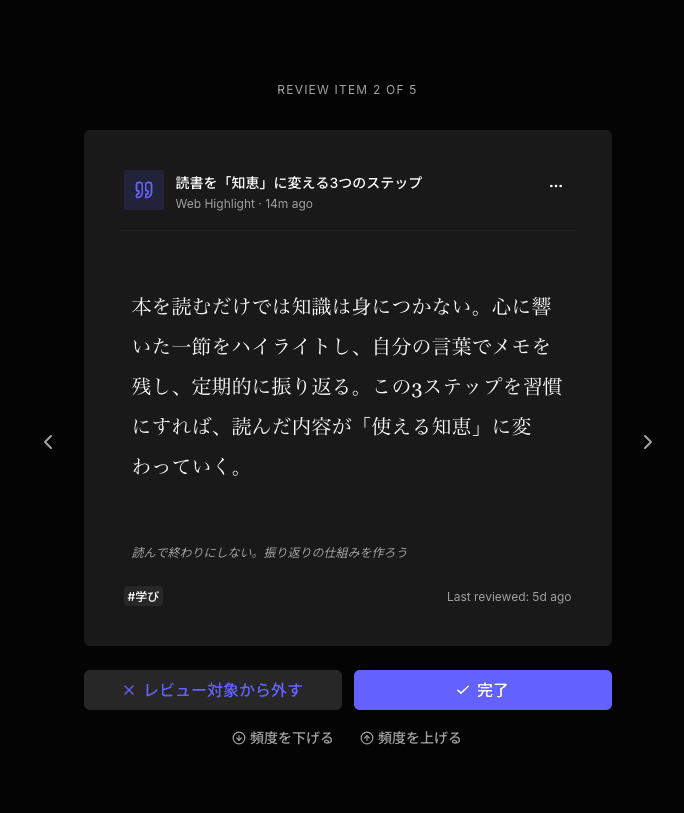
- A daily review brings saved items back in front of you, so an article you forgot has a chance to be read instead of staying buried.
- You do not have to keep "read later" items separate from your normal bookmarks. They live together.
- The Free plan lets you try the core experience before deciding.
It is also fair to say what Osarai is not. It is not a way to recover Pocket data that was lost after the export window closed. It is not a full replacement for every reading workflow. It is not built around AI auto-sorting or learning retention. Osarai's focus is narrower. Save it, read it, search it, and be reminded of it.
 Osarai
Save links. Find them again.
Save articles and posts you want for later in one place. Search what you remember, and let daily review bring buried saves back.
How to Choose
You do not need a long checklist. One question covers most cases.
If you save articles only to look them up later on purpose, browser bookmarks are usually enough. If you mainly read long-form articles and want a focused reading view, Instapaper fits. If you want one organized library for many kinds of links, Raindrop.io fits. If you want a full dedicated reading pipeline, Readwise Reader fits.
If your real problem is that you save articles and never come back to them, the deciding factor is whether the place brings saved items back to you. That is the gap Osarai is built to close, and the Free plan is enough to see whether it changes how often you actually read what you save.
OsaraiSave links. Find them again.
Save articles and posts you want for later in one place. Search what you remember, and let daily review bring buried saves back.
Read more

Bookmark Manager Guide: How to Save, Find, and Revisit Links
Compare browser bookmarks, bookmark managers, read-it-later apps, web clippers, and Osarai to choose where to save links.

Read-It-Later Apps: How to Choose Where to Save Articles, Docs, and Links
Compare read-it-later apps for articles, X posts, docs, tool pages, and PDFs. Learn when to use Instapaper, Raindrop.io, Readwise Reader, or Osarai.

Matter Alternatives: Six Options for Saving, Reading, and Revisiting
Matter is still running, but it does not fit every reader. Compare Readwise Reader, Raindrop.io, Instapaper, Wallabag, Readeck, and Osarai and pick what matches how you actually save and read.