
Looking for an Instapaper Alternative
Instapaper does one thing well. It gives you a calm place to read. The reading view is clean, the text is easy on the eyes, and features like text-to-speech and Kindle delivery turn saved articles into something you can actually finish.
So why look elsewhere? For a lot of people, the reading is not the problem. The problem is what happens after the save. Articles pile up. You stop opening the app. The thing you meant to come back to slips out of view, and you forget it was ever there. On top of that, articles are not the only thing worth keeping. An X post about a new AI feature you wanted to try. One page of official documentation you know you will need again. A tool's pricing page. A PDF. Instapaper is built around reading articles, so those other items tend to land somewhere else.
This article walks through a few real alternatives and where each one fits. None of them is a drop-in clone. Instapaper's reading experience, its text-to-speech, and its Kindle integration are still hard to match. The point here is to help you decide what matters most for your own habits, then pick the place that serves it.
How to Compare Your Options
It helps to know what you are optimizing for before you switch. A few distinctions tend to decide things.
One axis is the reading experience itself. Some tools put most of their care into the moment you read, with a quiet view and listening features. Instapaper sits firmly here.
Another axis is organization. Some tools are built to sort what you save into collections and tags, so you can structure a large library.
A third axis is highlights and review. Some tools center on capturing highlights and resurfacing them later for recall.
A fourth axis is whether what you saved comes back into view at all. Saving is easy. Returning to it is the part most tools leave to you. A few are built so that older saves surface again on their own, which changes whether you ever act on them.
Where you land on these four points narrows the field quickly. The candidates below each lean toward a different one.
Free Browser Bookmarks
Before paying for anything, it is worth naming the option you already have. The built-in bookmarks in Chrome and Safari cost nothing, sync across your devices, and handle any kind of page. An article, a tool page, a doc, all of it can go into a folder.
The trade-off is that they stop at the link. There is no reading view, no full-text search across the contents, and nothing that brings an old bookmark back to your attention. For a small set of frequently used sites, a bookmark bar is enough. For a growing pile of things you meant to read or try later, it tends to become the place links go to be forgotten.
Instapaper, as the Baseline
Since most readers here already use Instapaper, it is the reference point. The free plan covers unlimited saves, syncing across platforms, and folders. That alone is a capable read-it-later setup.
Instapaper Premium is $5.99 per month or $59.99 per year. It adds full-text search across your articles, a permanent archive, a PDF reader, unlimited notes, Kindle integration, text-to-speech, and an ad-free website. If your reason for staying is the reading and listening, Premium is the natural upgrade, and you may not need to leave at all. The reasons to look elsewhere are usually about everything around the reading.
Raindrop.io, for Organizing What You Keep
Raindrop.io leans toward organization. Its Free plan includes unlimited bookmarks, unlimited collections, unlimited highlights, and unlimited devices, which is generous for building a structured library across articles, tool pages, and other links.
Its Pro plan adds full-text search, a web archive, reminders, annotations, and a duplicate and broken links finder. If your instinct is to file things into neat collections and you want a clean place to keep many kinds of links, Raindrop fits that habit well. It is less of a reading-first tool than Instapaper, so it is a better match when sorting matters more to you than the reading view.
Readwise and Readwise Reader, for Highlights and Recall
Readwise approaches saving from the angle of highlights. It pulls highlights together and resurfaces them for review, and the subscription includes Readwise Reader, a read-it-later app. Pricing is $9.99 per month billed annually, or $12.99 per month billed monthly.
This is the strongest pick if your goal is to capture passages and revisit them over time. It is built for people who highlight heavily and want those highlights to come back. If you mostly want to save whole pages and read them, rather than work with highlights, it may be more machinery than you need.
Osarai, for Saving in One Place and Not Losing It
Osarai is a bookmark manager built around a single idea. The things you save to read later, try later, use later, or read again should come back to you instead of disappearing into a list.
It keeps the four kinds of activity together. You save, you read, you search, and you remember.
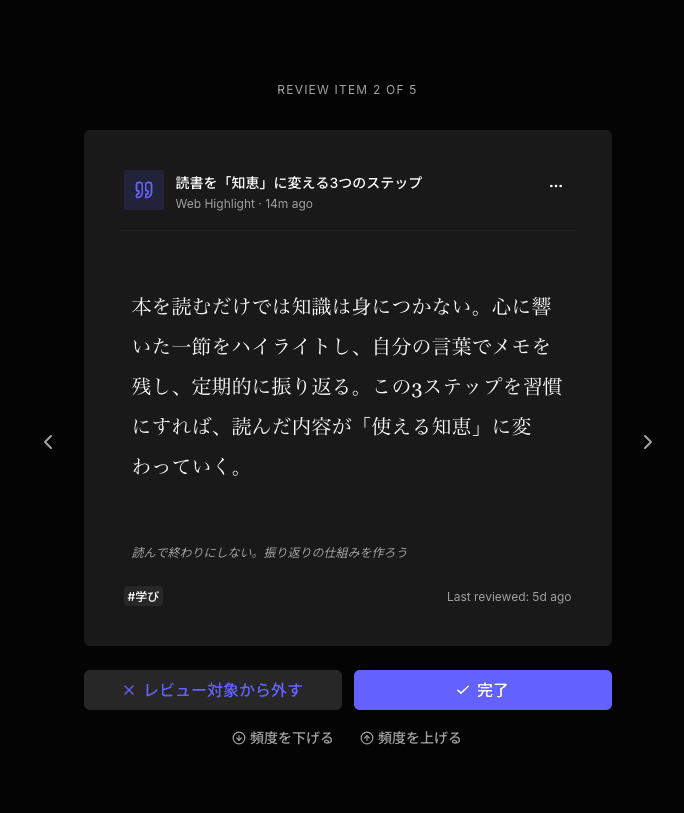
You can save articles, X posts, documentation, tool pages, and PDFs into the same place, so the X post about a new AI feature and the one doc page you want to revisit do not scatter across different apps. Saved articles open in an ad-free reading view. You can search across titles, descriptions, your own notes, and the body text to find something you half remember. And a daily review brings older saves back into view, so a page you meant to come back to actually returns rather than waiting for you to go looking.
Osarai does not separate read-it-later from regular bookmarks. They live together, which removes the question of where something went. The Free plan lets you try the core experience, with a paid Pro plan for things like full-text body search, X import, and PDF import.
To be clear about the edges, Osarai is not a full replacement for Instapaper. It does not aim to match Instapaper's reading polish, its text-to-speech, or its Kindle integration, and it is not built around automatic AI sorting or memorization. It also will not recover data from a service you have left behind. What it focuses on is keeping your saves in one place and making sure they resurface.
 Osarai
Save links. Find them again.
Save articles and posts you want for later in one place. Search what you remember, and let daily review bring buried saves back.
A Note on Pocket
If you arrived here because Pocket shut down, you are not alone in needing somewhere new to go. Pocket is no longer a current option, so it is not part of this comparison. The tools above are the active places people are moving their saved reading and links to.
Picking the One That Fits
There is no single best answer, only the one that matches how you save and read.
If the reading and listening are what you love, stay with Instapaper and consider Premium. If you want to file many kinds of links into tidy collections, look at Raindrop.io. If your habit is highlighting and you want those highlights to return, Readwise and Reader are built for that. If your real problem is that saved things vanish from view, and you want articles, X posts, documentation, tool pages, and PDFs to sit together and come back on their own, Osarai is worth a try. And if you only keep a handful of frequently used sites, your browser's bookmarks may already be enough.
OsaraiSave links. Find them again.
Save articles and posts you want for later in one place. Search what you remember, and let daily review bring buried saves back.
Read more

Matter Alternatives: Six Options for Saving, Reading, and Revisiting
Matter is still running, but it does not fit every reader. Compare Readwise Reader, Raindrop.io, Instapaper, Wallabag, Readeck, and Osarai and pick what matches how you actually save and read.

Omnivore Alternatives: Where to Go After the Shutdown
Omnivore shut down after the ElevenLabs deal. Compare Readwise Reader, Raindrop.io, Instapaper, Readeck, Wallabag, and Osarai to pick the right next save.

Raindrop.io Alternatives: Instapaper, Readwise, Osarai, and When to Use Each
Not every Raindrop alternative fits the same need. This guide covers Instapaper, Readwise, and Osarai so you can find the tool that matches how you save, read, and come back to what matters.